


With the catalog configured, we can now deploy our first VMs using VRA. This includes both Linux and Windows workloads, with optional Active Directory integration for automated domain join.
Linux VM deployment
From the catalog, select the blueprint > Click Request

VRA will begin provisioning.

You can monitor progress in both VRA and vCenter and in few minutes our linux VM is deployed

Windows VM deployment with AD domain join
Integrating VRA with AD
To integrate VRA with AD, so machines automatically can join to AD after deployment go to Infrastructure > Integrations > Add integrations
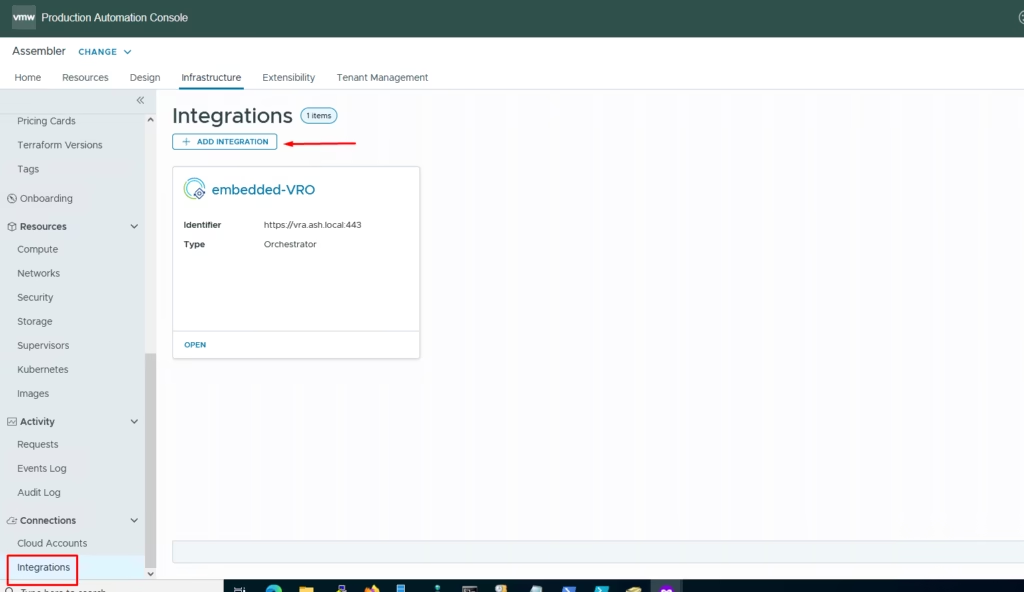
Click on Active Directory

Provide all the AD details and click validate

Our AD integration is ready

For the windows VM, we tweak the VM a bit more by applying a VM customization and a sysprep on the VM which is documented here – https://vmanalyst.com/windows-sysprep-for-vm

From the catalog, select the blueprint > Click Request. VRA will begin provisioning.

You can monitor progress in both VRA and vCenter and in few minutes our Windows VM is deployed and AD joined.

Status of our AD joined VM
