


I’ve covered of the installation of AWX in my previous modules so with minkube and AWX was deployed via AWX Operator inside Minikube. AWX was exposed via NodePort (30543) on the host IP (172.16.11.121) and vRA requires HTTPS on port 443 with a valid hostname and JSON response.
vRA fails with: Unable to obtain oAuth2 token and Error while reading post response body.
So that’s the first bit of an issue that you see with configuring Aria automation as we execute these curl commands
curl -X POST -u admin:VMware123! -H “Content-Type: application/json” http://172.16.11.121:30543/api/v2/tokens/
root@vra [ ~ ]# curl -k https://ansible.ash.local/api/v2/ping/
curl -k -X POST https://172.16.11.121:30543/api/v2/tokens -u “admin:VMware123!” -H “Content-Type: application/json”
curl -k -X POST https://172.16.11.121/api/v2/tokens -u “admin:VMware123!” -H “Content-Type: application/json”
curl: (7) Failed to connect to 172.16.11.121 port 443 after 0 ms: Couldn’t connect to server
curl: (35) OpenSSL/3.0.15: error:0A00010B:SSL routines::wrong version number
So we need to expose the port from our minikube for https traffic so It is NOT exposing your Ingress on your host IP (172.16.11.121) so as per this output the ingress that gets exposed is 10.98.142.21 which is actually the minikube IP
awk@ansible:~/playbooks$ ^C
awk@ansible:~/playbooks$ kubectl get svc -n ingress-nginx
NAME                                 TYPE           CLUSTER-IP      EXTERNAL-IP   PORT(S)                      AGE
ingress-nginx-controller             LoadBalancer   10.103.177.23   <pending>     80:30144/TCP,443:30154/TCP   30h
ingress-nginx-controller-admission   ClusterIP      10.98.142.21    <none>        443/TCP                      30h
So the fix here is simple,
Enable Ingress in AWX Custom Resource
This configures AWX to expose its web interface via Kubernetes ingress, which allows routing external HTTPS traffic into the cluster. It sets the hostname and TLS secret for secure access.
kubectl patch awx awx-ubuntu -n ansible-awx --type merge -p '
  spec:
    ingress_type: ingress
    ingress_hosts:
      - hostname: ansible.ash.local
tls_secret: awx-tlsConfiguring a Nginx Reverse Proxy
Since Minikube ingress IP is internal and not externally reachable, Nginx can be used on the host to act as a reverse proxy. It listens on the LAN IP and port 443, forwarding HTTPS requests to the Minikube ingress IP, bridging external clients to the internal cluster.
Lets create the certificates first.
openssl req -x509 -nodes -days 365  -newkey rsa:2048 -keyout ansible.ash.local.key -out ansible.ash.local.crt -subj "/CN=ansible.ash.local"

kubectl create secret tls awx-tls --cert=ansible.ash.local.crt --key=ansible.ash.local.key -n ansible-awxConfirm Ingress is Created

Install Nginx on Host and Configure Reverse Proxy
sudo apt install nginx -yCreate /etc/nginx/sites-available/awx.conf:
server {
    listen 443 ssl;
    server_name ansible.ash.local;

    ssl_certificate     /etc/ssl/ansible.ash.local.crt;
    ssl_certificate_key /etc/ssl/ansible.ash.local.key;

    location / {
        proxy_pass https://192.168.49.2;
        proxy_ssl_verify off;
        proxy_set_header Host $host;
        proxy_set_header X-Real-IP $remote_addr;
        proxy_set_header X-Forwarded-For $proxy_add_x_forwarded_for;
        proxy_set_header X-Forwarded-Proto https;
    }
}Enable the site
sudo cp ansible.ash.local.crt /etc/ssl/
sudo cp ansible.ash.local.key /etc/ssl/
sudo ln -s /etc/nginx/sites-available/awx.conf /etc/nginx/sites-enabled/
sudo nginx -t
sudo systemctl restart nginxNow a simple curl -k https://ansible.ash.local/api/v2/ping/ will give the ping response and that shows like our HTTPS on port 443 is working

AWX is now exposed over HTTPS on your LAN IP, fully compatible with vRA. No hacks, no port forwarding, no NodePort just clean ingress and reverse proxy.
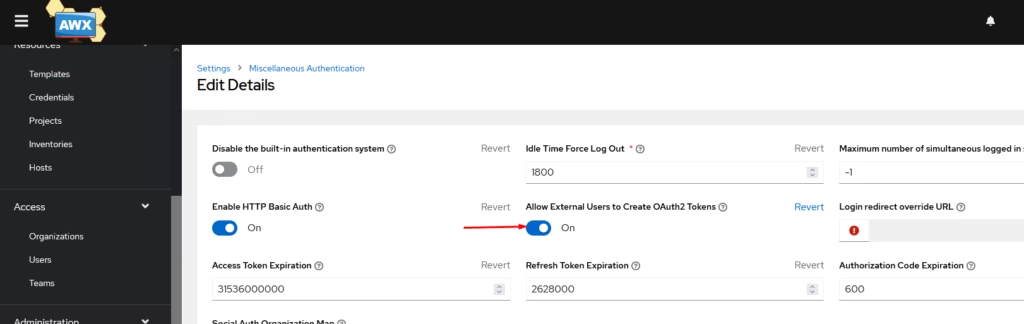
One last step is to enable External users to be to create token on Ansible Tower.
https://knowledge.broadcom.com/external/article/373523/awx-ansible-tower-integration-fails-with.html
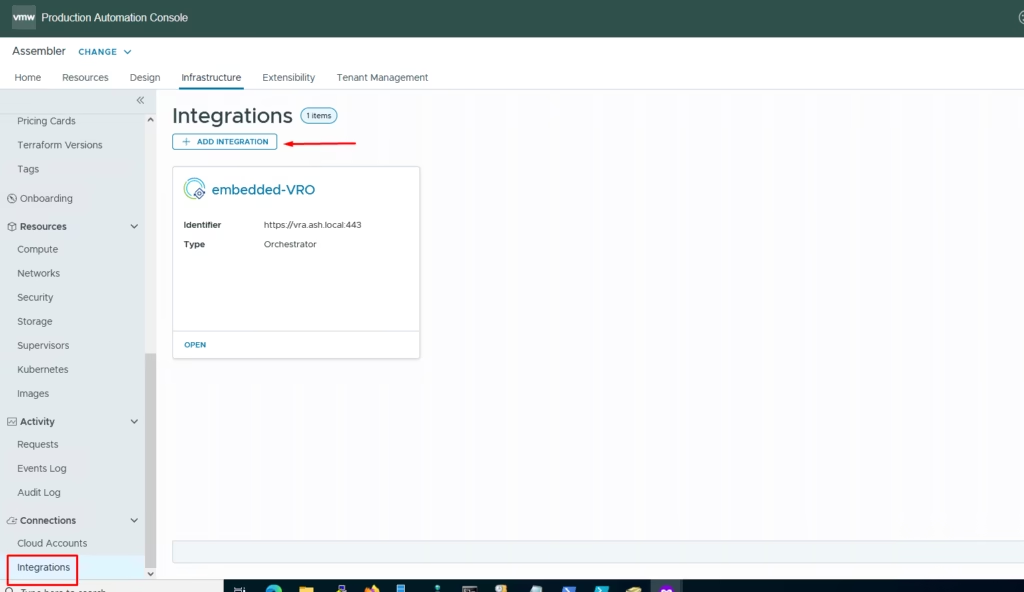
Integrating Ansible Tower with Aria Automation
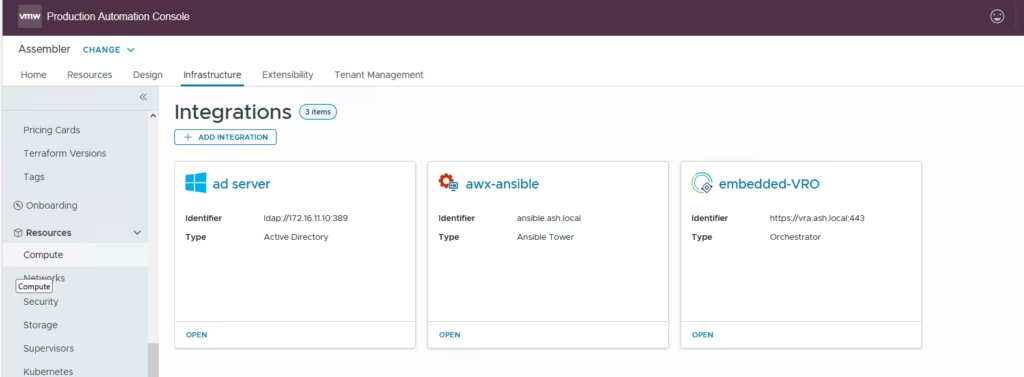
To integrate VRA with AWX, for ansible automation go to Infrastructure > Integrations > Add integrations
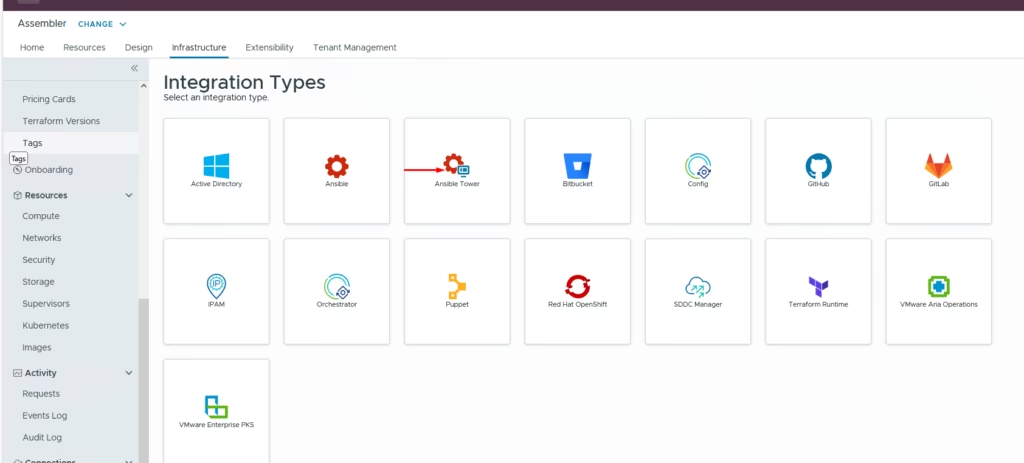
Click on Ansible Tower
Provide all the AWX details and click validate
- Type: Ansible Tower
- Hostname:
ansible.ash.local - Username:
admin - Password: (AWX admin password)
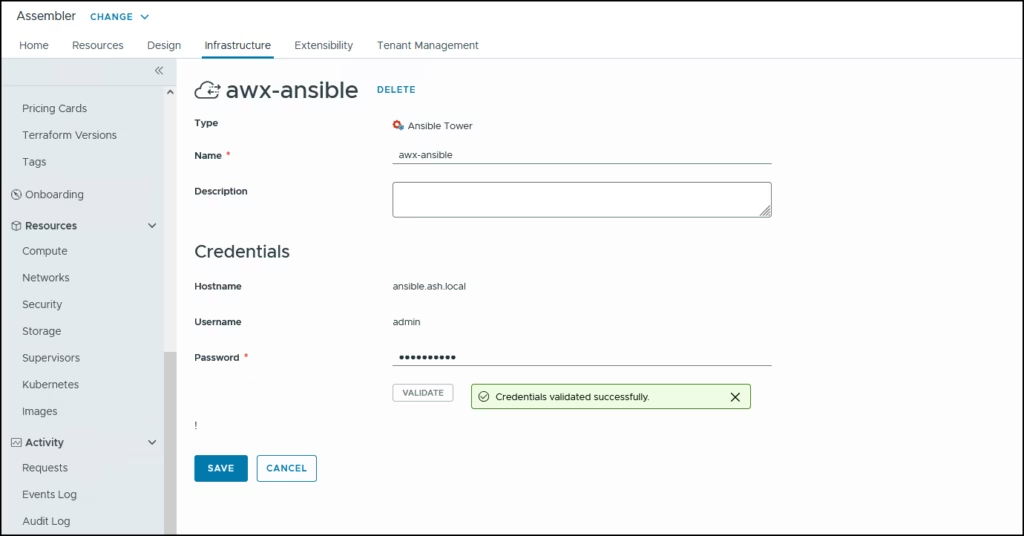
Our AWX integration is ready
Create a new Cloud Template in vRA as you normally would.
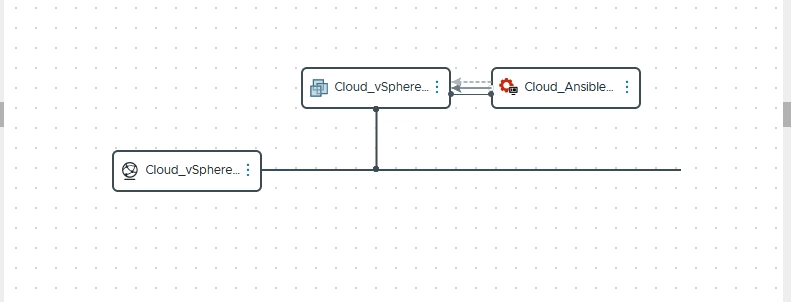
formatVersion: 1
resources:
  Cloud_vSphere_Network_1:
    type: Cloud.Network
    properties:
      networkType: existing
  Cloud_vSphere_Machine_1:
    type: Cloud.vSphere.Machine
    properties:
      image: ubuntu
      flavor: extra-small
      networks:
        - network: ${resource.Cloud_vSphere_Network_1.id}
  Cloud_Ansible_Tower_1:
    type: Cloud.Ansible.Tower
    dependsOn:
      - Cloud_vSphere_Machine_1
    properties:
      account: awx-ansible2
      host: ${resource.Cloud_vSphere_Machine_1.address}
      templates:
        provision:
          - template: helloworld
            extra_vars: ${map("vm_name", resource.Cloud_vSphere_Machine_1.name, "image", resource.Cloud_vSphere_Machine_1.image, "flavor", resource.Cloud_vSphere_Machine_1.flavor)}
        update:
          - template: helloworld
            extra_vars: ${map("vm_name", resource.Cloud_vSphere_Machine_1.name)}
        deprovision:
          - template: helloworld
            extra_vars: ${map("vm_name", resource.Cloud_vSphere_Machine_1.name)}
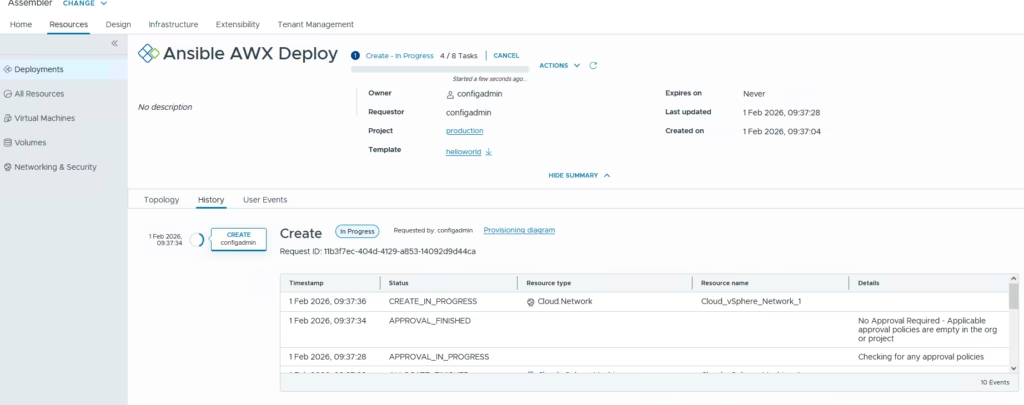
Click deploy to start a new deployment
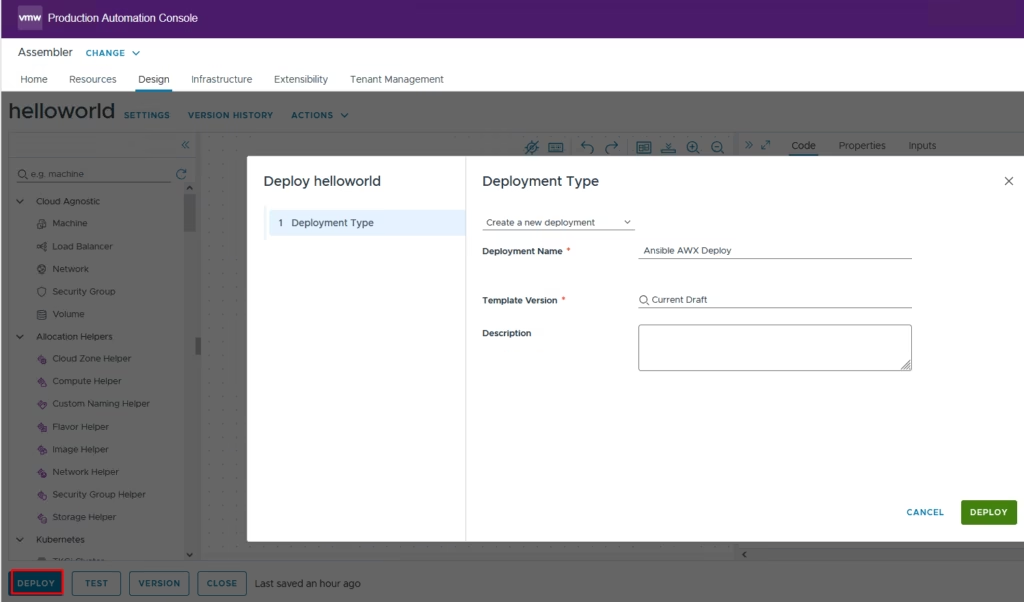
Click submit
References
https://knowledge.broadcom.com/external/article/373523/awx-ansible-tower-integration-fails-with.html