


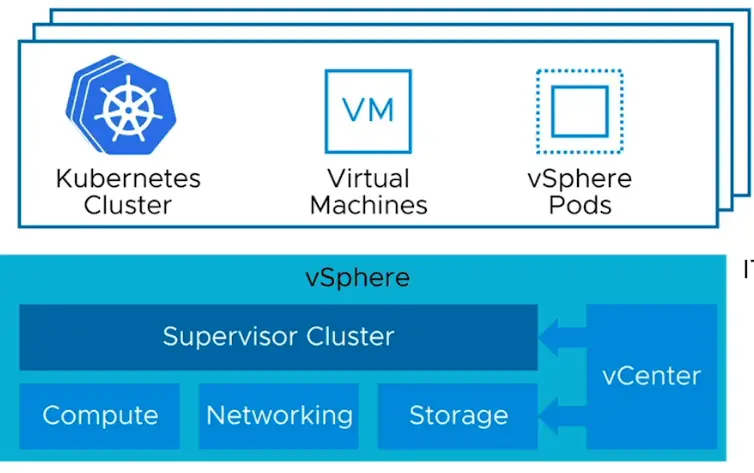
vSphere with Tanzu integrates and transforms vSphere into a native Kubernetes platform. On top of our standard vCenter that runs VMs, our vSphere will embed Kubernetes directly which then helps us run modern apps.
VMware Tanzu editions package capabilities of the Tanzu portfolio into clearly defined solutions targeted at the most common enterprise challenges. There are four Tanzu editions, each a superset of the one before it along a spectrum, giving customers a clear path to add capabilities over time as needed.

Tanzu Basic
As the name suggests, Tanzu Basic is the most affordable and accessible Tanzu edition. Tanzu basic can be deployed on vSphere only.
Tanzu Standard
Tanzu standard supports a multi-cloud environment, meaning you can deploy in an on-prem vSphere environment or on Public Cloud. Currently, Azure and AWS are supported. In case, the client is looking for production-grade deployment, you can think of Tanzu Standard.
Tanzu Advance
Tanzu advance mainly focuses on DevSecOps delivery of application workload. This comes with all sets of features available in Tanzu Standard but also brings additional features to meet quick and secure application workload delivery.
Tanzu Enterprise
Tanzu Enterprise has the following products in it
| Build | Modern Apps – Bitnami and Pivotal |
| Run | Tanzu Kubernetes Grid and Tanzu Kubernetes Grid Integrated edition |
| Manage | Tanzu Mission Control for central management |
Deployment Options of Kubernetes – NSX-T vs vDS
We can choose to deploy Kubernetes via the vCF route or by using a standard vCenter. Starting with vSphere 7 U1, for the networking side, we can deploy Kubernetes using vDS or the NSX-T route.
Kubernetes is going to need a load balancer whether that is external or not. With NSX-T we get networking on pods managed by NSX-T and also get the load balancer inbuilt but if we go the vDS route we do have to rely on an external load balancer. Again the registry (harbour) is built into NSX-T and its missing in the vDS route
Components of Tanzu Objects inside our vCenter
- Supervisor Cluster
- Control Plane VM
- vSphere Pods
- Namespaces
- Harbor Registry
What is a Supervisor Cluster?
With deploying Kubernetes via the non-VCF route, what we do is turn an existing ESX cluster into a special Kubernetes cluster known as the Supervisor cluster. During the installation of the Supervisor cluster, all ESXi hosts will be pushed a VIB package also known as Spherelet which is responsible for the management of the pods. These ESXi nodes are also called worker nodes.
What are Control Plane VMs or Control Plane Nodes?
The supervisor cluster will have 3 VM’s in it known as Control VMs that provide API access for kubectl to send commands in. These VMs will have 2 NICs on them – one goes to the management network and the second NIC is being used for cluster traffic which is the pod traffic. These control plane VMs run the infrastructure services for the Kubernetes services and pods for our supervisor cluster and they are also sometimes referred to as Control Plane Nodes.
On single-zone deployment, Supervisor control plane VMs run on a single vSphere Cluster, providing cluster-level HA.

What are vSphere Pods?
The base of a pod is a Linux kernel that runs multiple containers on it and its an equivalent of Kubernetes pod. vSphere Pods use three types of storage depending on the objects that are stored, that are ephemeral VMDKs, persistent volume VMDKs, and containers image VMDKs.

What is Container Registry – Harbor?
This is a placeholder to store all our images so this is something similar to the public repo – Docker Hub
What are Name Spaces?
Namespaces are where Kubernetes pods are deployed. Every namespace can be taken as a resource pool and we can set limits for cpu, memory, storage once its up and running.
What are vSphere Zones and VKS Clusters?
VKS Clusters can be deployed on multiple vSphere clusters to provide HA for workloads. The 3 control VM’s that provide API access for kubectl to send commands in will be deployed to each of three clusters and this is what’s called as vSphere zones. Kubernetes clusters deployed by the vSphere supervisor service are also called VKS clusters. For example, if you dedicate 300 MHz of CPU, 100 MHz are taken from each vSphere cluster.
