


Modern SharePoint environments grow quickly. New sites appear for projects, teams, departments, and temporary work. Over time many of these sites become inactive, lose their owners, or continue to store content that no one reviews. This creates clutter, increases risk, and makes it harder for users and tools like Microsoft Copilot to find the right information.
Site Lifecycle Management in SharePoint is designed to solve this problem. It gives administrators a structured way to monitor site activity, confirm ownership, and ensure that every site remains relevant and properly managed.
This feature is part of SharePoint Advanced Management and plays an important role in governance, compliance, and long term content control.
Understanding Site Lifecycle Management
Site Lifecycle Management is a governance capability in SharePoint that focuses on keeping sites relevant, owned, and reviewed throughout their lifetime. It helps administrators answer three critical questions: Is the site still being used, is there someone responsible for it, and does it still meet the organization’s standards for access and purpose. By enforcing these checks, organizations can:
- Protect sensitive information by removing abandoned content
- Reduce content sprawl
- Keep sites active and relevant
- Ensure every site has a responsible owner
- Support compliance and audit requirements
- Improve search and Copilot results
This approach reduces long term risk while allowing collaboration to continue without unnecessary restrictions.
How SharePoint Implements Lifecycle Governance
SharePoint delivers lifecycle governance through a set of targeted policies. Each policy addresses a specific governance need, and together they ensure that sites remain active, accountable, and compliant. These policies don’t block collaboration — they guide it in a sustainable, well‑managed way.
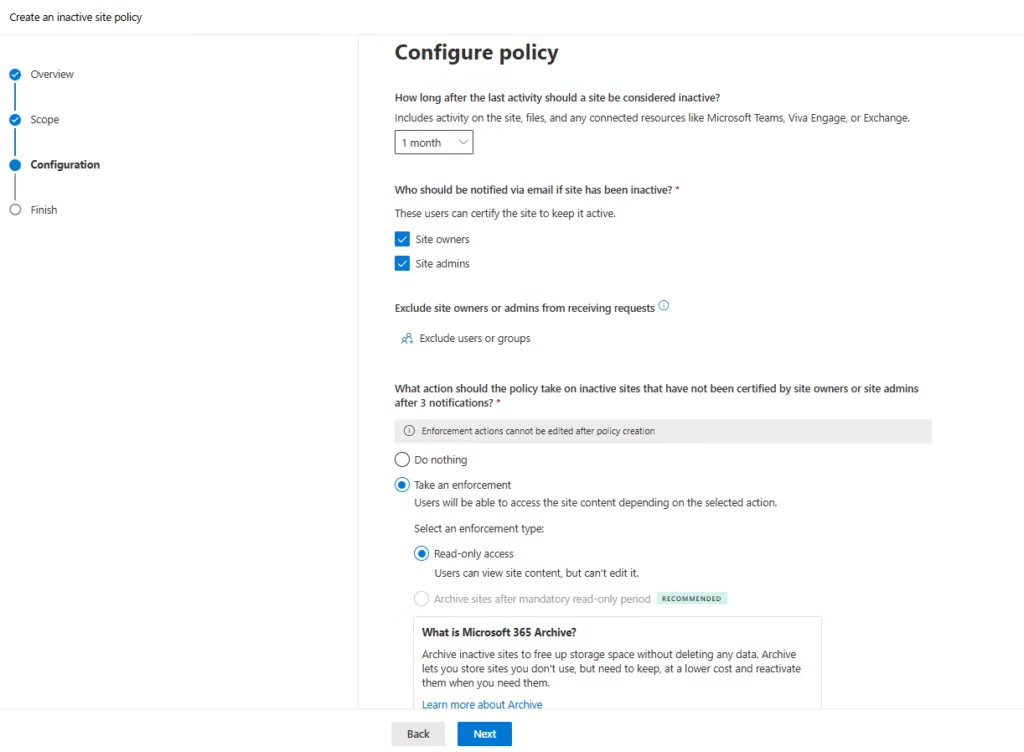
Inactive site policies
Inactive site policies identify sites that no longer show meaningful activity. SharePoint evaluates signals such as:
- File access
- Content updates
- User engagement
When a site meets the inactivity threshold, SharePoint notifies the site owner and asks whether the site is still required. The owner can:
- Keep the site active
- Archive its content
- Allow it to follow the organization’s retirement process
Inactive sites often contain sensitive or business‑critical information, so managing them proactively reduces exposure and simplifies governance.
Site ownership policies
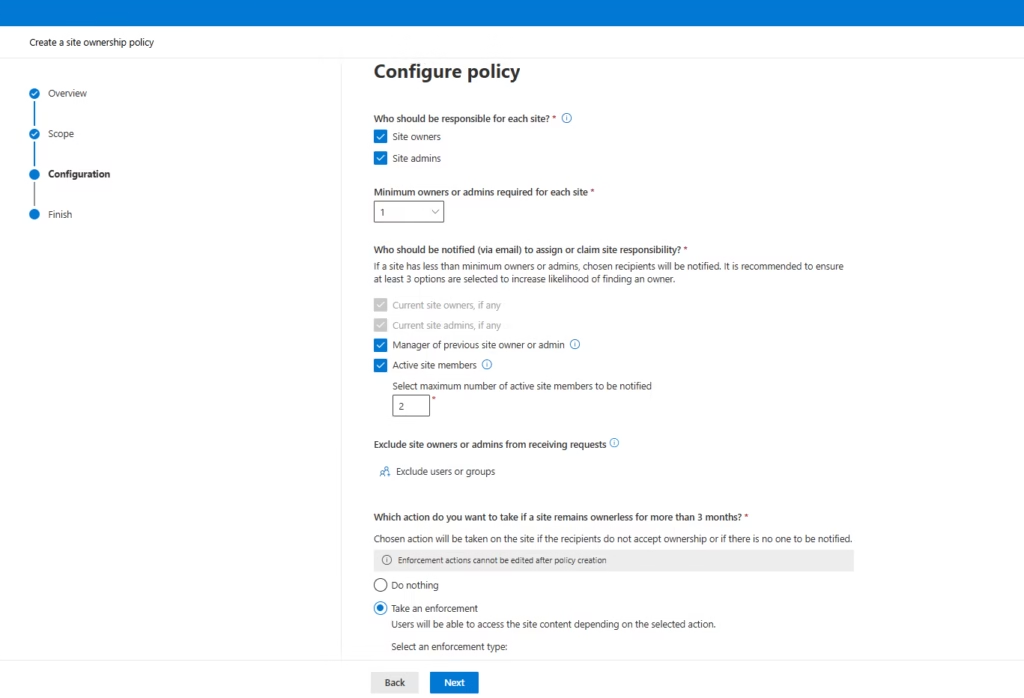
Ownership policies ensure accountability. Every SharePoint site should have at least one active owner who understands the site’s purpose and manages access appropriately.
As people change roles or leave the organization, ownership can become outdated. Ownership policies help identify sites without valid owners and trigger actions such as:
- Assigning a new owner
- Escalating the site for administrative review
Clear ownership ensures that permission reviews, sharing decisions, and compliance checks are handled by someone who understands the business context.
Site attestation policies
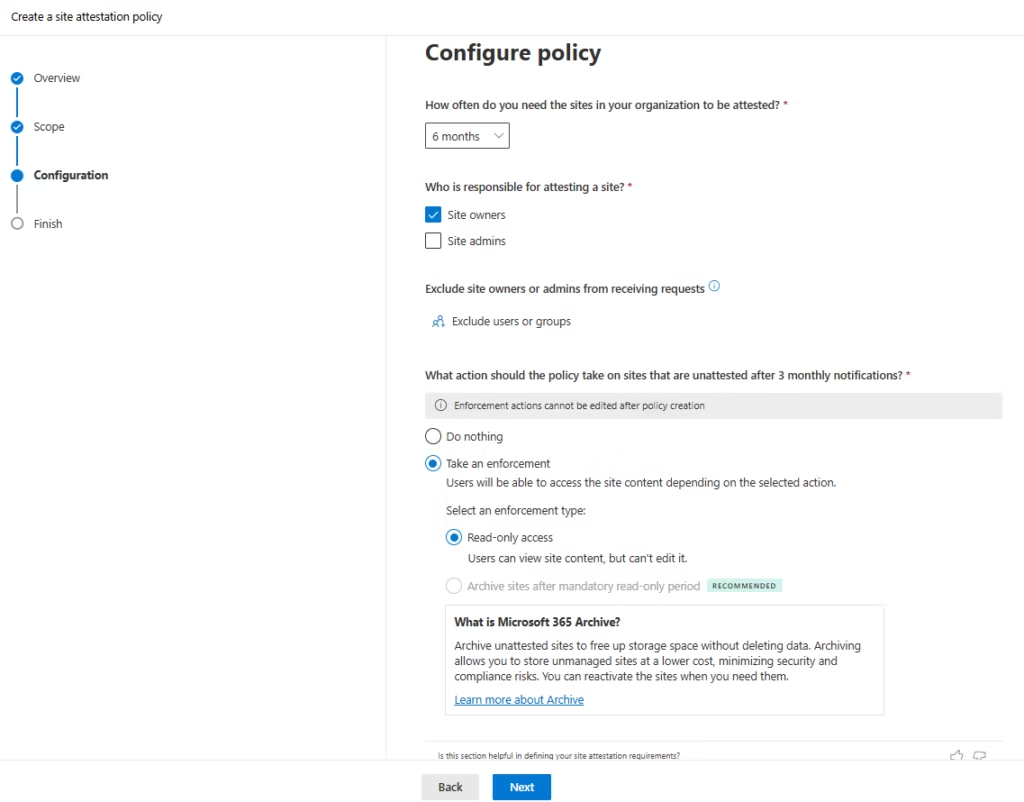
Attestation policies introduce a structured review cycle. At defined intervals, site owners are asked to confirm that their site is still needed and compliant.
During attestation, owners typically review:
- Site purpose
- Membership
- Sharing settings
- Usage
This creates a record of active review — not passive neglect — which is especially valuable for organizations with audit or compliance requirements.
Lifecycle policy enforcement
Whether it’s inactivity, ownership, or attestation, it includes 3 monthly notifications. These reminders are sent once per month, giving site owners or administrators three opportunities to take action. If no action is taken after the third reminder, the policy automatically applies the enforcement option you selected during setup. The enforcement options are:
- Do nothing: The policy stops reminding users and takes no further action.
- Set the site to read only: Users can view content but cannot edit. This is a safe, reversible way to freeze unmanaged sites.
- Archive the site (after a mandatory read only period): The site moves into low cost Microsoft 365 Archive storage. It can be reactivated later if needed.
This consistent reminder and enforcement cycle ensures that unmanaged or abandoned sites do not remain fully accessible indefinitely, while still giving owners multiple opportunities to take action.
Summary
Site Lifecycle Management in SharePoint brings structure and accountability to your environment. It helps administrators maintain a clean and secure workspace while reducing manual effort. By using inactive site policies, site ownership policies, and site attestation policies, you create a predictable and responsible lifecycle for every site in your tenant.