


A successful SharePoint migration depends far more on preparation than on the technical process of moving files. When the destination environment is designed with clear structure, ownership, and governance, content lands in the right place, users understand how to work in the new space, and the organisation avoids the long-term issues that come from migrating content into an unplanned environment. Preparation is the foundation of a clean, organised, and sustainable SharePoint experience.
This guide focuses on the planning and architectural steps that should be completed before any migration tool is used. These steps ensure that the new environment supports collaboration, compliance, and long-term growth.
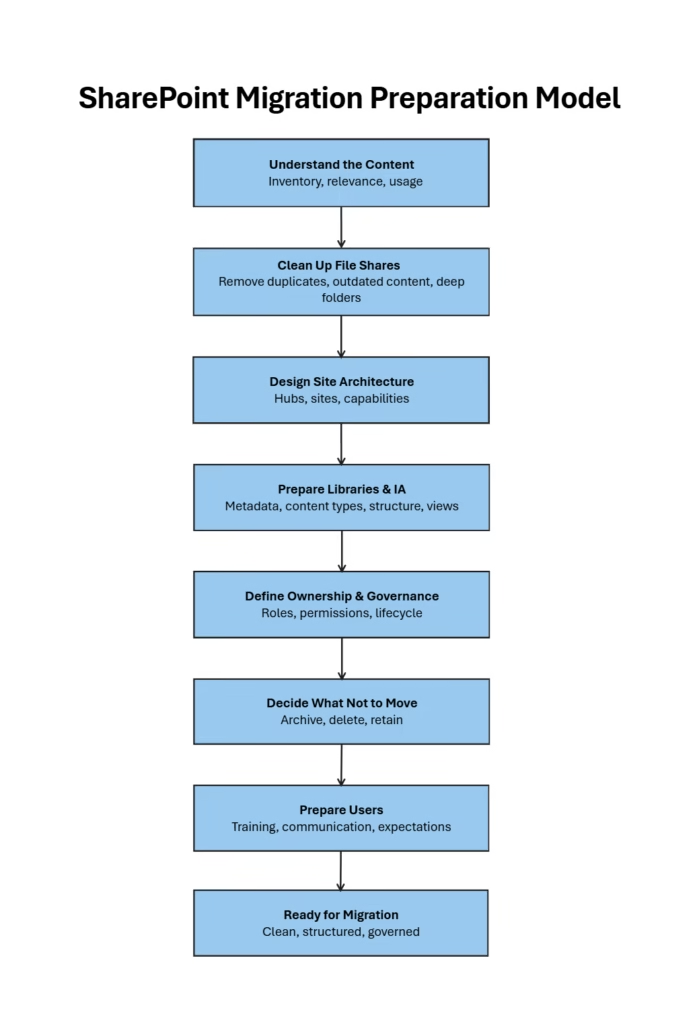
Understand the Content You Are Migrating
Before designing the new SharePoint structure, it is important to understand the nature of the existing content. File shares and legacy systems often contain a mix of active documents, outdated material, duplicates, and content that no longer has business value.
Example A Finance department may have ten years of invoices stored in deep folders. Only the most recent two years are actively used. This insight helps determine what should be migrated and what should be archived.
Understanding the content helps you design a structure that reflects real business needs rather than assumptions.
Clean Up File Shares Before Migration
Migrating everything without review is one of the most common mistakes. File shares often contain personal files, outdated drafts, and documents that have not been used for years.
Scenario A team may have folders named Final, Final New, Final Updated, and Final Updated New. This indicates that the content needs review before migration.
Cleaning up the source reduces clutter, improves search results, and prevents unnecessary storage costs. This step also ensures that only meaningful, current, and compliant content enters the new information architecture.
Design a Scalable Site Architecture
A well designed site structure ensures that content lands in the correct location from the start. Group sites by business capability rather than by individuals or temporary teams.
Example Instead of creating a site for each team member in Finance, create a Finance hub with sites for Payroll, Procurement, and Reporting.
Each site should have a clear purpose, a defined audience, and a predictable lifecycle. This approach prevents site sprawl and creates a consistent experience for users.
Establish Hub Sites and Navigation
Hub sites provide structure and clarity across the SharePoint environment. They connect related sites, provide consistent branding, and offer a unified navigation experience.
Before migrating content, decide which hubs you need and how sites will be associated with them. A well planned hub structure helps users move through the environment with confidence and ensures that related content stays connected. It also improves search scoping and supports governance.
Prepare Document Libraries with Metadata and Content Types
Document libraries should be ready before any content is migrated. Define metadata that reflects how the organisation works, such as document type, department, status, or review date. Use content types for controlled documents such as policies, procedures, or templates.
Scenario A Policies library may use metadata such as Policy Type, Owner, and Review Date. This ensures that migrated content becomes searchable and manageable rather than a flat collection of files.
Preparing libraries in advance ensures that content can be organised, filtered, and governed effectively.
Define Ownership and Governance
Every site requires clear accountability. Assign a Business Owner who is responsible for the purpose and lifecycle of the site, and a Site Owner who manages the structure, permissions, and day to day organisation.
Establish naming conventions, retention rules, and permission models before migration begins. Governance ensures that the environment remains healthy and predictable long after the migration is complete.
Decide What Not to Migrate
Not all content should be moved into the new environment. Identify documents that are outdated, duplicated, irrelevant, or beyond retention requirements.
Example Human Resources may have onboarding documents from ten years ago that are no longer valid. These should be archived or deleted rather than migrated.
Migrating less content often results in a cleaner and more efficient environment.
Prepare Users for the New Structure
Migration is not only a technical project. It is also a change management activity. Provide clear guidance on how the new environment is structured, where content will live, and how to use metadata, views, and search.
Early communication helps users adapt quickly and reduces confusion after migration.
Pre-Migration Tasks
A short checklist helps ensure the environment is ready before any content moves.
- Confirm the site architecture and hub structure
- Prepare document libraries with metadata and content types
- Assign Site Owners and clarify responsibilities
- Finalise what will be migrated and what will be archived
- Review permissions and ensure they align with the new structure
- Communicate the plan to users and stakeholders
These tasks create a stable foundation for the migration process.
Post Migration Tasks
Once content has been migrated, a few checks help ensure everything is working as expected.
- Validate permissions and confirm that users have the correct access
- Check that metadata has been applied correctly
- Review navigation and ensure links are working
- Confirm that content landed in the correct sites and libraries
- Ask Site Owners to review their areas and report any issues
- Provide guidance and support to help users adjust to the new structure
These steps help stabilise the environment and ensure a smooth transition.
Summary
Preparing the SharePoint environment before migration is one of the most important steps in creating a clean, organised, and sustainable digital workplace. By understanding the content, cleaning up file shares, designing a scalable site structure, establishing hubs, preparing libraries, defining ownership, and communicating with users, organisations can ensure that content lands in the right place and remains manageable in the long term. A well prepared environment sets the foundation for a successful migration and a more effective SharePoint experience.