


In this part of the series, we’ll design our BGP router and connect it to the Tier‑0 (T0) gateway in NSX‑T. The T0 gateway is responsible for connecting NSX‑T to the outside world, making dynamic routing essential for a functional nested lab.
I’ve already covered BGP in one of my previous demo on VCF 4.X so feel free to read it. The IP’s address that we connect from NSX to the router will need to be defined in the BGP routes.
Network Design Overview
We’ll use two VyOS routers acting as Top‑of‑Rack (ToR) devices. Each router peers with the NSX‑T T0 gateway using BGP.

Configuration on Router 1
VyOS is a regular Linux but offers a configuration experience similar to commercial switches/routers.
Router 1 Interfaces
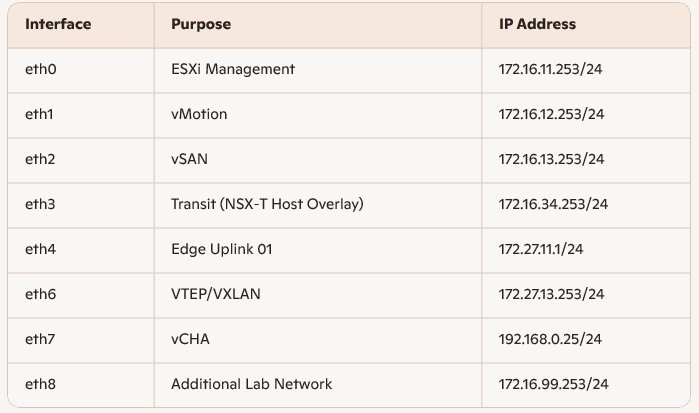
set interfaces ethernet eth0 address '172.16.11.253/24'
set interfaces ethernet eth1 address '172.16.12.253/24'
set interfaces ethernet eth2 address '172.16.13.253/24'
set interfaces ethernet eth3 address '172.16.34.253/24'
set interfaces ethernet eth4 address '172.27.11.1/24'
set interfaces ethernet eth6 address '172.27.13.253/24'
set interfaces ethernet eth7 address '192.168.0.25/24'
set interfaces ethernet eth8 address '172.16.99.253/24'
set protocols static route 0.0.0.0/0 next-hop 172.16.99.252
set service ssh port '22'
commit
save
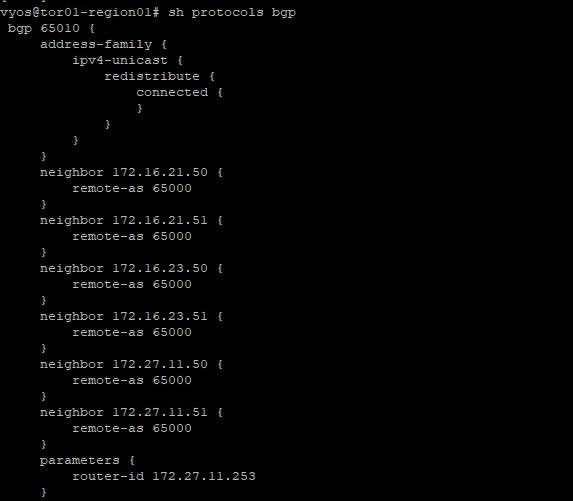
Enable BGP
- AS 65010 for VyOS
- AS 65000 for NSX-T (needs to be configured in NSX-T)
- have the VyOS box advertise its connected routes to NSX-T
set protocols bgp 65010 address-family ipv4-unicast redistribute connected
set protocols bgp 65010 neighbor 172.27.11.50 remote-as '65000'
set protocols bgp 65010 neighbor 172.27.11.51 remote-as '65000
commit
save
Show BGP configuration
The route 172.27.11.50 and 127.27.11.51 are being advertised
Configuration on Router 2
Router 2 Interfaces
set interfaces ethernet eth0 address '172.27.12.1/24'
set interfaces ethernet eth1 address '192.168.0.26/24'
set protocols static route 0.0.0.0/0 next-hop 172.16.99.253
set service ssh port '22'
commit
save
Enable BGP
- AS 65010 for VyOS
- AS 65000 for NSX-T (needs to be configured in NSX-T)
- have the VyOS box advertise its connected routes to NSX-T
set protocols bgp 65010 address-family ipv4-unicast redistribute connected
set protocols bgp 65010 neighbor 172.27.12.50 remote-as '65000'
set protocols bgp 65010 neighbor 172.27.12.51 remote-as '65000

commit
save
Show BGP configuration

Verifying BGP on VyOS
The BGP status can be checked in the regular mode (not configure mode) and here routes are being advertised
vyos@router-tor-01:~$ sh ip bgp summary
IPv4 Unicast Summary:
BGP router identifier 192.168.0.25, local AS number 65010 vrf-id 0
BGP table version 9
RIB entries 17, using 3128 bytes of memory
Peers 2, using 41 KiB of memory

Neighbor        V         AS MsgRcvd MsgSent   TblVer  InQ OutQ  Up/Down State/PfxRcd
172.27.11.50    4      65000     179     189        0    0    0 02:53:17            2
172.27.11.51    4      65000     179     189        0    0    0 02:53:12            2

Total number of neighbors 2
Advertised Routes can be checked either via ip r or show ip bgp:
vyos@router-tor-01:~$ sh ip bgp
BGP table version is 9, local router ID is 192.168.0.25, vrf id 0
Default local pref 100, local AS 65010
Status codes:  s suppressed, d damped, h history, * valid, > best, = multipath,
               i internal, r RIB-failure, S Stale, R Removed
Nexthop codes: @NNN nexthop's vrf id, < announce-nh-self
Origin codes:  i - IGP, e - EGP, ? - incomplete

   Network          Next Hop            Metric LocPrf Weight Path
*> 172.16.11.0/24   0.0.0.0                  0         32768 ?
*> 172.16.12.0/24   0.0.0.0                  0         32768 ?
*> 172.16.13.0/24   0.0.0.0                  0         32768 ?
*> 172.16.34.0/24   0.0.0.0                  0         32768 ?
*> 172.16.99.0/24   0.0.0.0                  0         32768 ?
*  172.27.11.0/24   172.27.11.51             0             0 65000 65000 65000 65000 ?
*                   172.27.11.50             0             0 65000 ?
*>                  0.0.0.0                  0         32768 ?
*  172.27.12.0/24   172.27.11.51             0             0 65000 65000 65000 65000 ?
*>                  172.27.11.50             0             0 65000 ?
*> 172.27.13.0/24   0.0.0.0                  0         32768 ?
*> 192.168.0.0/24   0.0.0.0                  0         32768 ?

Displayed  9 routes and 12 total paths
Verifying BGP on NSX‑T Edge
On the NSX-T side the routes can be checked by using the CLI on the Edge nodes
vyos@router-tor-01:~$ ssh admin@172.16.11.81
NSX CLI (Edge 3.0.0.0.0.15946012). Press ? for command list or enter: help
edge01>
edge01>
edge01> get logical-router
Logical Router
UUID                                   VRF    LR-ID  Name                              Type                        Ports
736a80e3-23f6-5a2d-81d6-bbefb2786666   0      0                                        TUNNEL                      4
d584bfc7-bee2-443a-a0e5-5ea2686e5727   1      2050   SR-TO-GW-01                       SERVICE_ROUTER_TIER0        6
87e7dc5c-63ed-4dc4-bb5b-dbd55801ac3f   3      2057   SR-t1-gw-01                       SERVICE_ROUTER_TIER1        5
e21fa173-0e5d-4a33-aefd-8303c1a9413c   4      2049   DR-TO-GW-01                       DISTRIBUTED_ROUTER_TIER0    4

edge01>
edge01> vrf 1
edge01(tier0_sr)> get route

Flags: t0c - Tier0-Connected, t0s - Tier0-Static, b - BGP,
t0n - Tier0-NAT, t1s - Tier1-Static, t1c - Tier1-Connected,
t1n: Tier1-NAT, t1l: Tier1-LB VIP, t1ls: Tier1-LB SNAT,
t1d: Tier1-DNS FORWARDER, t1ipsec: Tier1-IPSec, isr: Inter-SR,
> - selected route, * - FIB route

Total number of routes: 13

t0c> * 100.64.224.0/31 is directly connected, downlink-288, 03:00:16
t0c> * 169.254.0.0/24 is directly connected, downlink-275, 02:56:11
b  > * 172.16.11.0/24 [20/0] via 172.27.11.1, uplink-274, 02:56:09
b  > * 172.16.12.0/24 [20/0] via 172.27.11.1, uplink-274, 02:56:09
b  > * 172.16.13.0/24 [20/0] via 172.27.11.1, uplink-274, 02:56:09
b  > * 172.16.34.0/24 [20/0] via 172.27.11.1, uplink-274, 02:56:09
b  > * 172.16.99.0/24 [20/0] via 172.27.11.1, uplink-274, 02:56:09
t0c> * 172.27.11.0/24 is directly connected, uplink-274, 12:03:36
t0c> * 172.27.12.0/24 is directly connected, uplink-296, 02:43:14
b  > * 172.27.13.0/24 [20/0] via 172.27.11.1, uplink-274, 02:56:09
b  > * 192.168.0.0/24 [20/0] via 172.27.11.1, uplink-274, 02:36:16
b  > * 192.168.0.0/24 [20/0] via 172.27.12.1, uplink-296, 02:36:16
t0c> * fcfe:ea8c:41d9:8800::/64 is directly connected, downlink-288, 03:00:16
t0c> * fe80::/64 is directly connected, downlink-288, 03:00:16
edge01(tier0_sr)>
Link TO router to External Routers
BGP Configuration for Dynamic Routing
NSX‑T supports both static routes and dynamic routing. For scalability, we configure BGP on the T0 gateway:
- Local AS: 65000
- ECMP: Enabled
- Graceful Restart: Enabled (Helper mode)
By default, the Graceful Restart mode is set to Helper Only. Helper mode is useful for eliminating and/or reducing the disruption of traffic associated with routes learned from a neighbour capable of Graceful Restart. The neighbour must be able to preserve its forwarding table while it undergoes a restart.

Our BGP is already configured on the upstream device, we can go ahead and set BGP Neighbors by clicking on the Set option.
A new wizard will be open. Click on the Add BGP Neighbors button to start configuring the neighbours.
Add BGP Neighbours
- Add ToR‑1 (VyOS Router 1) as a neighbor
- Specify source addresses from T0 uplinks

Add BGP Neighbour as our Top of Rack Router -2
- Add ToR‑2 (VyOS Router 2) as a neighbor
- Specify source addresses from T0 uplinks

Click on Save to finish the BGP neighbour addition wizard. Thus in total we now have 4 interfaces from each edge and they connect to our physical BGP routers.

Enable Route Re-distribution
Route Re-distribution provides the capability of publishing routes from T0 GW to the upstream devices.
To enable Route Re-distribution, edit settings of T0 GW and expand Route Re-distribution and toggle Route status button to enable it.

Clicking on the Set button opens Add Route Re-Distribution wizard.
Provide a name for the rule and click Set to specify which Tier-0 subnets will be advertised to the upstream device.
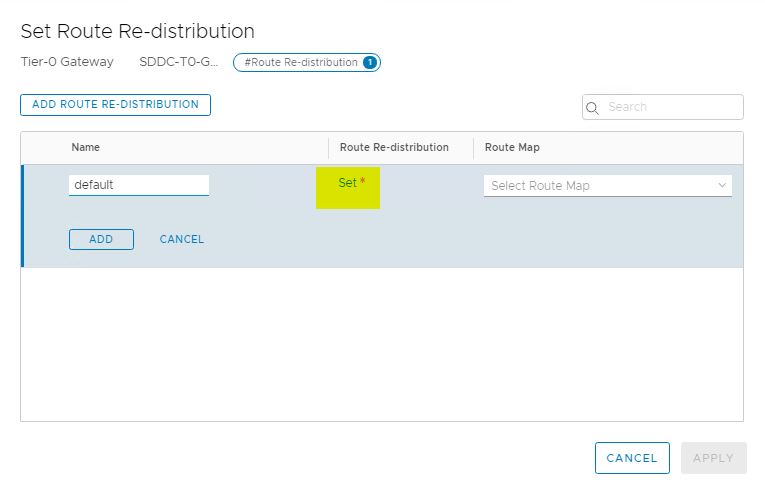
Select subnets to advertise and click on Apply.

Click on Apply button again to finish the wizard.

Click on save to save the Route Re-distribution settings.

Once we are done with configuring T0 we can view the topology by navigating to Networking > Network Topology.

With BGP configured between VyOS and NSX‑T T0, your lab now supports dynamic routing, enabling seamless connectivity between nested ESXi networks and the external world. This setup mirrors real‑world enterprise designs, making your vCF lab both operationally true and future‑ready.