Managing a handful of servers with Ansible is easy. Managing dozens is still fine. But once you start thinking about hundreds — or even thousands — the traditional hosts file becomes messy, error‑prone, and hard to maintain.
sudo apt install yamllintyamllint to show something in syntax
yamllint -f colored remove-packages.ymlAdd these to variables in vim ~/.vimrc
syntax on
filetype plugin indent on
set autoindent
set smartindent
set nu
set expandtab
set tabstop=2
set shiftwidth=2
initial structure looked like this:
/etc/ansible
├── ansible.cfg
├── hosts
├── playbooks/
└── pyvmomi-community-samples/
And hosts file defined three OS groups
[ubuntu]
gitlab ansible_host=GitLab.ash.local ansible_user=awk ansible_become=yes
[zorin]
platform ansible_host=platform.ash.local ansible_user=awk ansible_become=yes
[centos]
centos01 ansible_host=centos01.ash.local ansible_user=awk ansible_become=yes
centos02 ansible_host=centos02.ash.local ansible_user=awk ansible_become=yes
But as soon as you start adding variables (like package names), the file becomes cluttered and fragile. We can do this but soon it gets messy so we need a new solution to do this than editing the hosts files
centos01 apache_package=httpd
gitlab apache_package=apache2
Move Variables Into group_vars/
Ansible has a built‑in mechanism for this: group_vars/ and host_vars/ for passing variables
Create the directory:
mkdir /etc/ansible/group_varsPut OS‑specific variables in those files
awk@ansible:/etc/ansible/group_vars$ ls -l
total 12
-rw-r--r-- 1 root root 65 Feb  1 11:02 centos.yml
-rw-r--r-- 1 root root 67 Feb  1 11:02 ubuntu.yml
-rw-r--r-- 1 root root 60 Feb  1 11:02 zorin.yml
for Centos
sudo vi centos.ymlDefine OS‑Specific Variables in group_vars for Centos
apache_package: apache2
common_packages:
  - git
  - curl
  - htop
for Ubuntu
sudo vi ubuntu.ymlDefine OS‑Specific Variables in group_vars for Ubuntu
apache_package: apache2
common_packages:
  - vlc
  - chrome
for Centos
sudo vi centos.ymlDefine OS‑Specific Variables in group_vars for Centos
apache_package: httpd
common_packages:
  - git
  - curl
  - nano
Single OS‑Agnostic Playbook Now Works Everywhere so sreate a playbook:
sudo /etc/ansible/playbooks/install-packages.ymlUse a single OS‑agnostic playbook
- hosts: all
  become: true

  tasks:
    - name: Install Apache based on group variable
      package:
        name: "{{ apache_package }}"
        state: latest

    - name: Install common packages
      package:
        name: "{{ common_packages }}"
        state: latest
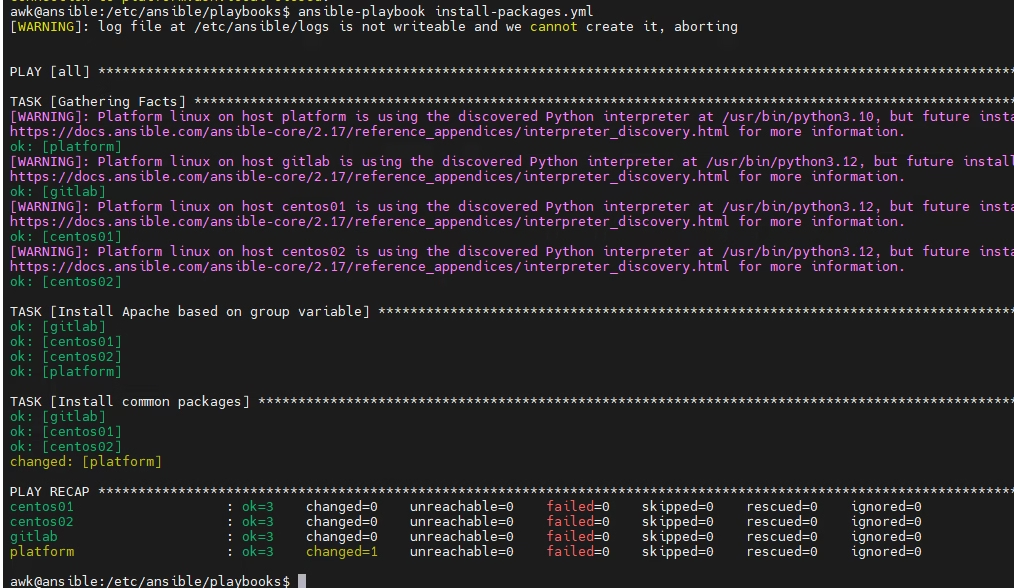
Run ansible
ansible-playbook playbooks/install-packages.yml -vBelow are outputs from ansible control node, we are looking at changed value