

External sharing is one of the most useful features in Microsoft 365, but it is also one of the most sensitive. Organisations collaborate with vendors, clients, contractors, and partners every day, and this often requires sharing documents or granting temporary access to sites. Without the right governance controls, external sharing can quickly become a security risk. Files remain shared long after projects end, guest accounts accumulate with no oversight, and sensitive information can be exposed unintentionally. The goal is not to block collaboration, but to make it safe, intentional, and well managed.
A secure external sharing strategy is built on a combination of tenant level settings, site level controls, domain restrictions, sensitivity labels, and regular access reviews. When these layers work together, users can collaborate confidently while the organisation maintains control over who has access and for how long. This blog walks through the key governance controls, explains how they fit together, and provides a simple way to apply them in real environments.
Why External Sharing Needs Governance
External sharing is not just a technical configuration. It is a business decision that affects risk, compliance, and user behaviour. Many organisations discover that external sharing has been enabled for years without any structure, resulting in thousands of guest accounts, unknown access paths, and files shared with people who no longer work with the company. Governance prevents this by defining who can share, what can be shared, and how long access should remain available.
Good governance also supports compliance requirements. Sensitive information must be protected, guest access must be reviewed, and sharing must align with organisational policies. When governance is missing, external sharing becomes unpredictable and difficult to manage. When governance is present, it becomes a controlled and valuable collaboration tool.
A Simple Governance Model for External Sharing
This conceptual diagram shows how external sharing decisions flow. It helps stakeholders understand that sharing is not a single switch, but a sequence of controlled decisions.
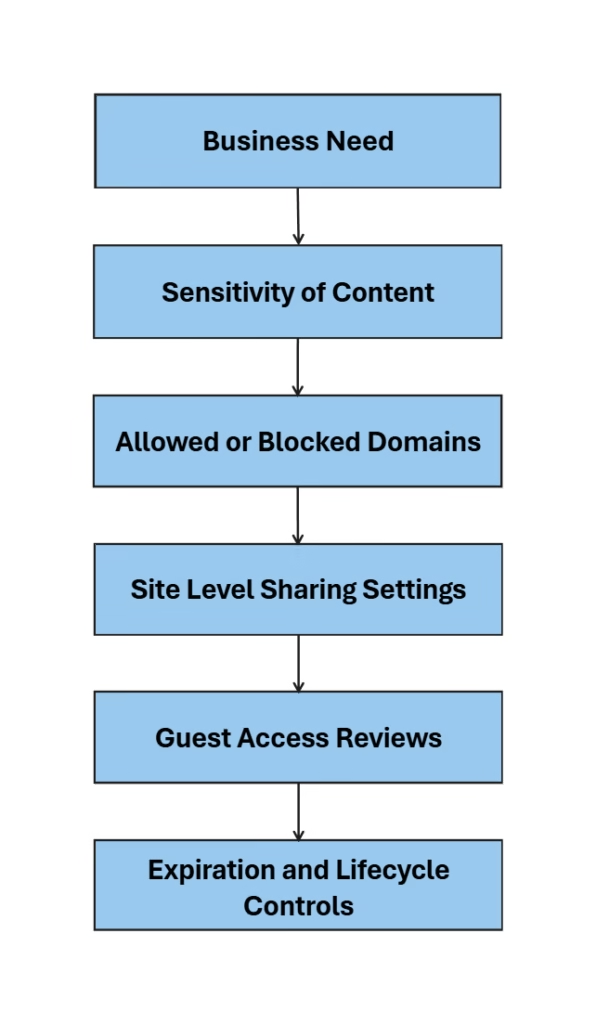
This model keeps sharing predictable and reduces long term risk.
Key Governance Controls to Use
Tenant Level Sharing Settings
The tenant defines the outer boundary for all sharing. This includes whether users can share with anyone, only authenticated external users, or only specific domains. Most organisations choose a moderate setting that allows sharing with authenticated external users while blocking anonymous links.
Domain Allow or Block Lists
Domain restrictions ensure that sharing only happens with trusted organisations. For example, you may allow sharing with a partner’s domain but block personal email domains. This prevents accidental sharing with unknown or high risk recipients.
Site Level Sharing Controls
Not all sites should allow external sharing. Sensitive areas like HR, Finance, or Legal should block external access entirely. Project or collaboration sites may allow it with restrictions. Site level controls ensure that each business area has the right level of protection.
Sensitivity Labels
Sensitivity labels add an extra layer of protection by controlling what external users can do. Labels can prevent downloads on unmanaged devices, require encryption, or block sharing entirely. This helps ensure that even if a file is shared externally, the organisation still controls how it can be used.
Guest Access Reviews
Guest accounts accumulate over time. Access reviews help identify which external users still need access and which should be removed. This reduces long term risk and keeps the environment clean.
Sharing Link Expiration
Expiration policies automatically remove old sharing links. This prevents long forgotten links from remaining active indefinitely.
A Real Scenario to Make It Clear
Imagine a project team working with an external vendor. They need to share documents, track progress, and collaborate on deliverables. Without governance, they might share files directly from personal OneDrive accounts or create ad hoc sharing links that remain active for years. This creates risk and confusion.
With governance, the team uses a dedicated project site with controlled external sharing. Only approved domains can access the site. Guest accounts expire after a set period. Sensitivity labels prevent downloads on unmanaged devices. Access is reviewed monthly. The team collaborates smoothly, and the organisation remains protected.
How to Apply These Controls in Practice
This section gives a simple, practical walkthrough. It is not a deep technical guide, but a clear starting point for applying governance controls.
1. Set Tenant Level Sharing Boundaries
Open the SharePoint admin center. Go to Policies. Select Sharing. Choose a sharing level that matches your organisation’s risk profile. Most organisations allow sharing with authenticated external users only.
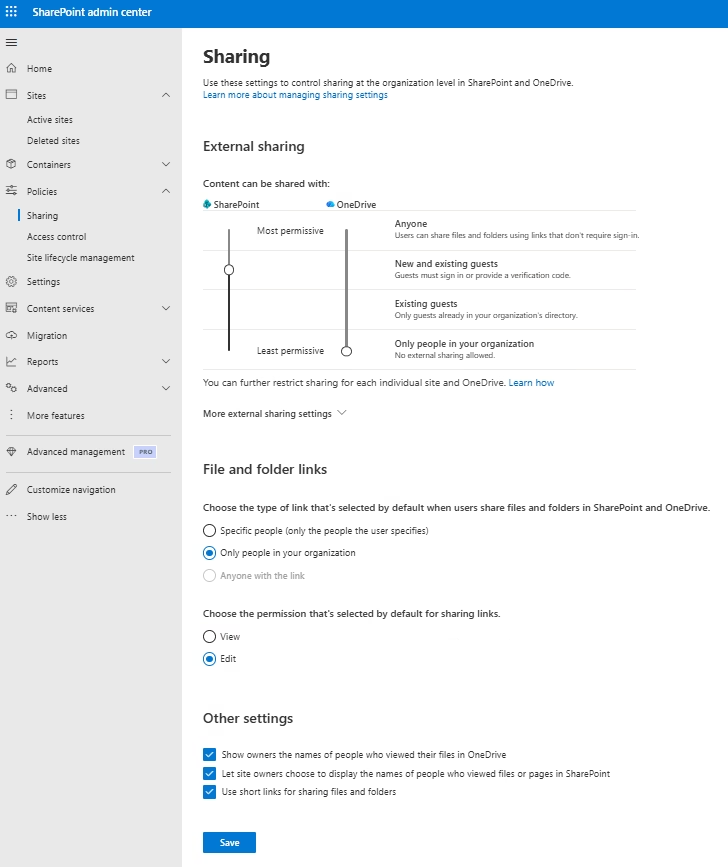
2. Configure Domain Restrictions
In the same area, select More external sharing settings. Add trusted partner domains to the allow list. Block personal or high risk domains. This ensures sharing only happens with approved organisations.
3. Adjust Site Level Sharing
Open the site in the SharePoint admin center. Select Policies. Select Sharing. Reduce sharing for sensitive sites. Block external sharing entirely for HR, Finance, or Legal.
4. Apply Sensitivity Labels
Open the Purview compliance portal. Create or publish sensitivity labels. Configure labels to restrict downloads or require encryption. Apply labels to libraries or documents containing sensitive information.
5. Enable Guest Access Reviews
Open Entra ID. Go to Identity Governance. Create access reviews for guest users. Schedule reviews monthly or quarterly. This keeps external access clean and up to date.
6. Set Link Expiration Policies
In the SharePoint admin center. Enable expiration for sharing links. Choose a reasonable timeframe such as 30 or 60 days. This prevents long term exposure.
Summary
External sharing is essential for modern collaboration, but it must be governed carefully. By combining tenant level boundaries, site level controls, domain restrictions, sensitivity labels, and regular access reviews, organisations can collaborate safely with external partners. A well designed governance model protects sensitive information, reduces risk, and gives users the confidence to work effectively.